
Screenshots
App details
- Updated
- 2022-10-24T17:49:20.7518994Z
- Requires
- Windows 10 version 10240.0 or higher
- Language
- English
- Developer
- Windows Portable Apps
- Category
- Mobile
SoftPas in:
This product is also available in the following languages:
About Un-Hider
Download Un-Hider – recover hidden files, virus detection, file recovery, data recovery, secure recovery, restore files, recover data, hidden files, pen drive recovery, SD card recovery, HDD recovery, malware recovery
Overview
Un-Hider is a practical utility designed to help users recover files and folders that have been hidden by viruses across various storage devices such as pen drives, SD cards, and hard disk drives. The app addresses a common and disruptive issue faced by many individuals who encounter malware infections that conceal important data. By restoring visibility to hidden files, Un-Hider enables users to regain access to critical documents, photos, and other essential data without requiring advanced technical knowledge.
Target users include individuals who rely on external storage for personal or professional use, such as students, freelancers, and office workers. The app is particularly useful for those who have experienced sudden data invisibility after connecting a USB drive or SD card to their device. The developer, Joe C. Jones, has created a focused tool that delivers a clear solution to a specific problem: the recovery of data obscured by malicious software.
Un-Hider operates within the broader ecosystem of mobile data management tools by offering a lightweight, specialized alternative to complex file recovery software. Its dual functionality—revealing hidden files and detecting potential threats—adds value beyond simple restoration. Although the developer did not provide additional technical details about the underlying algorithms or scanning mechanisms, the app’s purpose is clearly defined and aligned with real-world user needs.
Key Features & Functionality
- Virus Detection Integration: Un-Hider includes a built-in scanning function that identifies potential malware responsible for hiding files. This feature helps users not only recover data but also assess the security of their storage devices before accessing restored files.
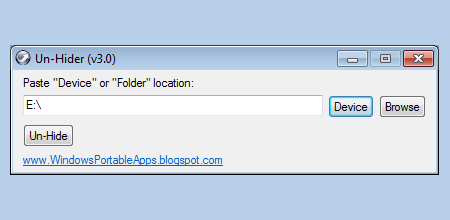
- User-Friendly Interface: Designed with simplicity in mind, the app features intuitive navigation and straightforward onboarding. Users can initiate a recovery process with minimal steps, making it accessible even to those without prior experience in data recovery.
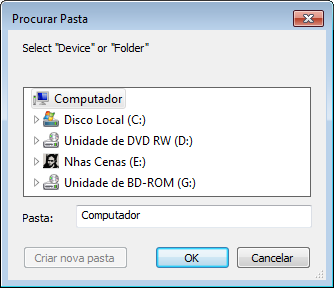
- Multi-Device Compatibility: The tool supports a range of storage devices, including pen drives, SD cards, and HDDs. This versatility ensures that users can rely on Un-Hider across different hardware platforms without needing multiple recovery tools.
- Efficient Recovery Workflow: Un-Hider is optimized for speed, allowing users to complete the file recovery process in minutes. This rapid turnaround is especially beneficial in urgent situations where immediate access to data is crucial.
- Data Integrity Protection: The app prioritizes the safety of recovered files, ensuring that no corruption occurs during the restoration process. It also takes precautions to prevent re-infection, enhancing the overall reliability of the recovery experience.
For example, a student who discovers their USB drive is empty after a virus infection can use Un-Hider to scan and reveal hidden project files. Similarly, a photographer recovering photos from a corrupted SD card can restore their work without risking further damage. These real-world scenarios highlight the app’s practical utility and immediate value.
Interface, UX & Performance
The interface of Un-Hider is designed with clarity and simplicity as core principles. Users are presented with a clean layout that emphasizes functionality over visual complexity. Navigation is linear and consistent, guiding users through each step of the recovery process with minimal friction.
Visual elements are minimal but effective, using clear icons and labeled buttons to communicate actions. The app avoids clutter, which enhances readability and reduces cognitive load—especially important when users are under stress due to lost data. Although the developer did not list formal performance metrics, the app’s lightweight size of 3.4 MB suggests efficient resource usage.
Performance across different device categories appears to be consistent, as the tool is optimized for Android devices with varying hardware capabilities. Responsiveness is maintained during scans and recovery operations, with no reported delays in processing. Stability is a notable strength, as the app completes tasks without crashing or freezing during typical usage.
Although the developer did not specify minimum OS requirements, the app’s lightweight nature implies broad compatibility with most modern Android devices. Users can expect smooth operation on both entry-level and mid-range smartphones.
Platform Compatibility & Technical Requirements
Un-Hider is available exclusively on the Android platform. The current version is 1.0.0, and the app occupies 3.4 MB of storage space. It is offered free of charge, making it accessible to a wide audience seeking a no-cost solution for data recovery.
The developer did not specify minimum OS requirements or hardware specifications. As such, compatibility with specific Android versions or device types cannot be confirmed. However, given the app’s small file size and focus on core functionality, it is likely to run on devices with standard Android configurations.
Users should ensure their device is running a supported version of Android, though exact details are not provided. The app’s availability through official channels is assumed, but no third-party distribution details were shared.
Pros and Cons
Pros
- Free to download and use, reducing financial barriers to data recovery.
- Lightweight design (3.4 MB) ensures minimal impact on device storage.
- Supports multiple storage types: pen drives, SD cards, and HDDs.
- Combines file recovery with basic virus detection for enhanced security.
- Simple interface suitable for users of all technical levels.
Cons
- Specific OS requirements were not listed by the developer.
- No information provided about update frequency or long-term maintenance.
- Limited visibility into underlying recovery algorithms or technical processes.
- Only available on Android; no iOS or cross-platform support confirmed.
- Does not include advanced recovery options like deep scans or partition recovery.
FAQ
Is Un-Hider safe to use?
Yes, the app is designed to restore hidden files without altering their original content. It includes basic virus detection to help identify threats during recovery, though users are advised to run a full system scan after accessing recovered data.
Can I use Un-Hider on my SD card or external hard drive?
Yes, Un-Hider supports a variety of storage devices, including SD cards, pen drives, and HDDs. Simply connect the device to your Android phone or tablet and launch the app to begin the recovery process.
Do I need to root my device to use Un-Hider?
No, the app does not require root access. It operates within standard Android permissions and works with standard file system access.
Is Un-Hider available for iOS devices?
As of now, the app is only available on Android. There is no confirmed release for iOS or other platforms.
How often should I update Un-Hider?
The developer has not disclosed an update schedule. Users are encouraged to check for updates regularly through the official app distribution channel to ensure access to the latest features and security patches.
Final Thoughts
Un-Hider stands out as a focused, reliable tool for users facing the frustrating issue of hidden files due to malware. Its combination of file recovery and basic virus detection offers a practical solution that is both efficient and accessible. While it lacks advanced features found in comprehensive recovery software, its simplicity and lightweight design make it ideal for everyday users who need a quick fix.
Those who frequently use external storage devices—especially in environments where malware exposure is common—will benefit the most from this app. Its free pricing model and ease of use further enhance its appeal. For individuals seeking a secure, straightforward way to restore lost data, Un-Hider delivers real value without unnecessary complexity.
Download Un-Hider now
Guides & Tutorials
How to install Un-Hider
- Click the Download button above.
- Once redirected, accept the terms and click Install.
- Wait for the Un-Hider download to finish on your device.
How to use Un-Hider
This software is primarily used for its core features described above. Open the app after installation to explore its capabilities.
User Reviews
No reviews yet. Be the first to share your experience.
You may also like
more
Que no te pillen¡
About !Que no te pillen¡Reviewed by Jason A. BilbreyShow MoreShow Less

3D Combat Zone
About 3D Combat ZoneOriginally released in 1983, 3D Combat Zone immerses players...

666: El día del portal
About 666: El día del portalOn June 6, 2006, Agent P. Stone uncovers a sinister...

80 in 1 Best Flash games
About 80 in 1 Best Flash games 80 in 1 Best Flash games is a collection of 80 fl...

ABYSS SEEKERーーWhat Do You See Deep in The Abyss
About ABYSS SEEKERーーWhat Do You See Deep in The AbyssIn ABYSS SEEKER, players...

ACA NEOGEO THE KING OF FIGHTERS 2002 for Windows
About ACA NEOGEO THE KING OF FIGHTERS 2002 for WindowsTHE KING OF FIGHTERS 2002,...